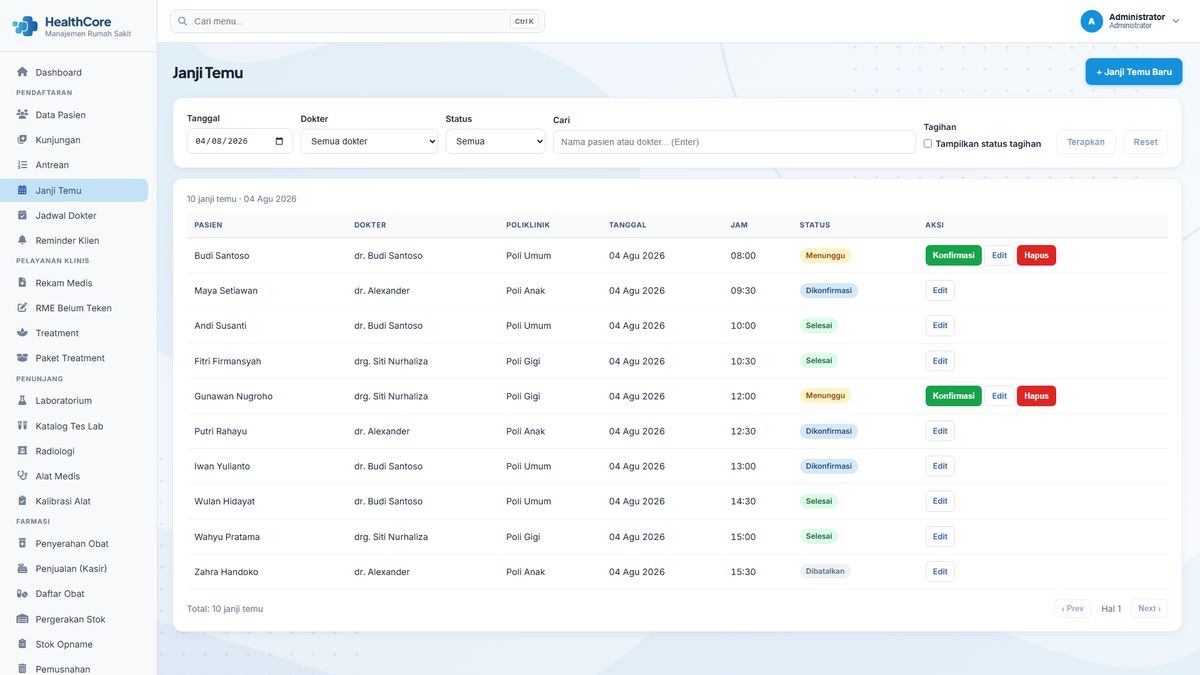
SIMRS Appointments & Queue Module: Scheduling and Per-Clinic Queues
The Appointments & Queue module manages the two things that most determine order in an outpatient service: who arrives when, and patients being called in a clear sequence. The module organizes visit slots based on doctor and polyclinic schedules, then keeps patient queues visible per clinic and per day. It works closely with patient registration so the flow from the counter to the clinic is never interrupted.
Appointment scheduling with conflict checks
One of the common causes of chaos in a clinic is two patients booked into the same slot, or a doctor whose schedule overlaps. This module performs appointment scheduling with conflict checks: the system verifies the requested slot against doctor schedules and existing visits, so conflicts are prevented before the visit happens. Front office staff see available slots without checking them one by one manually.
Queue status per clinic and per day
Each clinic has a queue list with clear statuses. Registered patients, waiting, called, and currently being examined. Queue status is shown per clinic and per day, so clinic nurses and front office staff always know where every patient stands without asking around or calling repeatedly. The queue number sequence is generated automatically based on the order of visits for that day.
Connected to registration and the examination flow
Scheduled or queued visits connect directly to registration and the examination flow. Patients whose data was already verified at registration are not re-entered at the clinic; the doctor opens the visit and proceeds to the clinical examination. This connection is also the basis for further development, such as queue displays at counters or waiting rooms.
Synced with patient master data
Scheduling uses patient data already verified in the registration module (medical record number, identity, and contacts) so visit slots always refer to the right patient. This prevents duplicate visits under the same name and keeps the patient’s history connected from the first visit.
Who uses this module
Registration and front office staff create and manage appointments and monitor queues; clinic nurses see the status of patients waiting to be examined; and doctors see the visits waiting in their clinic. All access is role-based according to each role’s responsibility.
One data set, one flow
Scheduling and queues work on the same visit data as other modules. Patients scheduled here appear in the clinic queue on the visit day, and visits in progress are forwarded to the clinical examination without re-entry. Conversely, walk-in patients can still enter through registration and receive a queue number on the same flow. Because all statuses are recorded on the same visit, the front office, clinic, and cashier read a consistent patient position. There are no separate lists that can contradict each other.
Getting started with this module
The module can start from the facility’s core needs first, then grow in phases. In line with HealthCore’s implementation principles. In the early phase, the facility team defines doctor and polyclinic schedules, decides how visits are accepted (appointments, walk-ins, or both), then trains registration staff and clinic nurses on that flow. Role-based training, go-live support, and data migration are quoted separately from subscription pricing, so the facility starts from the highest-impact flow without changing every process at once.